Skip to main content
UCPath
UCPath
UC San Diego
Search
This Site
All UCSD Sites
Faculty/Staff
Search Term
Close Nav
Log in to UCPath
About
UCPath Project Roadmap
Self-Service
First Time in UCPath
Benefits
Payroll
Newsroom
UCPath System Updates
Transactors
Local UCPath Job Aids
UCPath Training
UCPath Funding
UCPath Reports
UCPath Events Calendar
Transactor FAQs
Need Help?
Frequently Asked Questions
Toggle navigation
MENU
Log in to UCPath
About
UCPath Project Roadmap
Self-Service
First Time in UCPath
Benefits
Payroll
Newsroom
UCPath System Updates
Transactors
Local UCPath Job Aids
UCPath Training
UCPath Funding
UCPath Reports
UCPath Events Calendar
Transactor FAQs
Need Help?
Frequently Asked Questions
Search Scope
This Site
All UCSD Sites
Faculty/Staff
Search Term
UCPath
Transactors
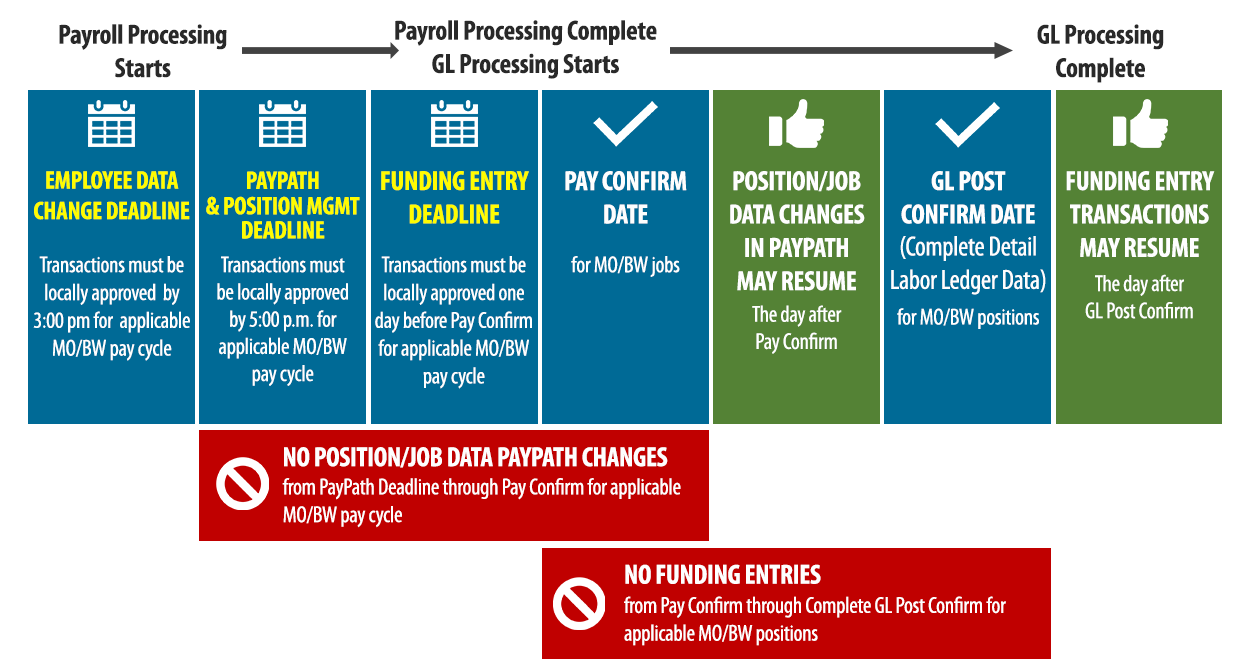
Pay Cycle Transaction Timeline
Deadlines & Non-transaction Days (MO/BW)